
JustCall is known for its sales and support calling features, but it’s also a powerful SMS automation platform that enables you to reach prospects and clients faster than ever. With average SMS open rates surpassing 90%, text messaging has become one of the most effective tools for outreach, follow-up, and conversion in a crowded digital space.
If you’re only using JustCall for voice calls, you’re missing out on a goldmine. In this guide, we’ll walk through how to build and use SMS workflows in JustCall that help close deals, reduce no-shows, and keep your sales funnel active with minimal manual effort.
Why Use SMS for Sales and Support Workflows?
SMS delivers results faster than email. On average, texts are read within 3 minutes of being received. For businesses that rely on speed, such as consultants, agencies, and B2B service providers, this immediacy can drastically increase lead conversion rates and reduce churn.
Unlike emails that get buried, SMS messages land directly in your prospect’s pocket. This makes them ideal for real-time lead follow-up, appointment reminders and confirmations, drip nurturing sequences for colder leads, and internal rep notifications about key lead activity. In short, SMS helps you connect when it matters most, quickly and personally.

How to Leverage JustCall SMS Automation?
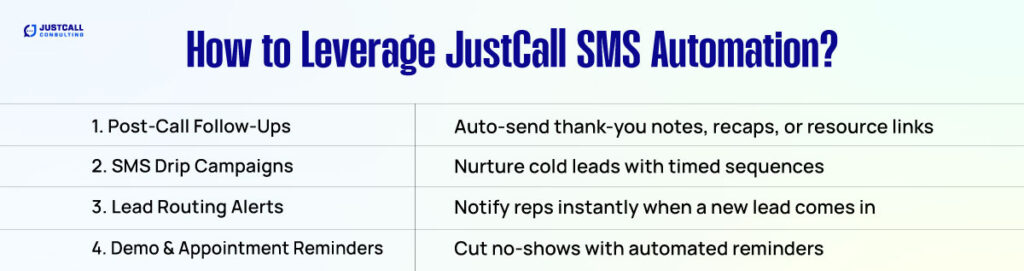
Let’s dive into how businesses use JustCall’s SMS automation to move leads through the pipeline and engage clients throughout the customer lifecycle.
1. Post-Call Follow-Ups
After a phone call ends, sending a quick recap, resource link, or thank-you message keeps the momentum alive. With JustCall, this can happen automatically without manual typing.
Example:
“Hi {{first_name}}, thanks for the chat! Here’s the deck we discussed: [link]. Looking forward to the next steps!”
Use this to reinforce conversations, confirm action items, or share relevant documents immediately.
2. SMS Drip Campaigns for Nurturing
For leads not ready to buy today, JustCall’s Sequences feature allows you to build SMS drip campaigns. These are time-based or trigger-based messages that nudge prospects forward, whether that’s downloading a resource, booking a call, or replying to a special offer.
You can set these to trigger based on CRM tags, Zapier automations, or manual enrollment.
Example Campaign:
This setup keeps your brand top of mind without feeling pushy.
Day 0: “Hey {{first_name}}, saw you checked out our pricing. Want a quick walkthrough?”
Day 2: “Still curious? Here’s what other {{industry}} pros love about us: [link]”
Day 5: “Spots for our demo week are almost gone. Want to reserve yours?”
3. Lead Routing Alerts for Sales Teams
Don’t let hot leads go cold. JustCall can automatically alert representatives via SMS when a new inbound lead is received by your system. This is especially useful when using webhooks or Zapier to route inquiries from forms, chatbots, or CRMs.
Example:
“New inbound lead from {{company_name}}. Call or text them now: {{phone_number}}”
This helps reduce response time and increases the chance of a successful connection.
4. Demo and Appointment Reminders
No-shows cost you revenue. With SMS reminders, you can reduce missed calls, consultations, and meetings. JustCall lets you set up automated reminders triggered by scheduled events in your calendar or CRM.
Example Reminder Message:
“Hi {{first_name}}, just a reminder about your demo with [Your Company] tomorrow at 2 PM. Here’s the link to join: [Zoom Link]”
You can even set up multiple reminders, such as 24 hours before and 1 hour before, to keep your no-show rate near zero.
How to Set Up SMS Workflows in JustCall?
Setting up SMS workflows in JustCall is simple. Here’s how to create high-converting automation without code.
1. Use JustCall Sequences
Head into the Sequences section in your JustCall dashboard. This feature enables you to create step-by-step SMS journeys that send messages based on time delays or user behavior. You can set the delay between messages, customize content, and assign them to reps or leads.
2. Trigger With CRM Tags or Zapier
Trigger SMS campaigns based on CRM activity. For example:
- Tag a contact as “Demo Booked” to start a pre-demo reminder series.
- Use Zapier to send an SMS when a lead submits a form, replies to an email, or enters a specific pipeline stage.
- Integrate with tools like HubSpot, Pipedrive, or Zoho CRM to automate texts based on contact behavior.
3. Personalize With Tokens
SMS is personal. JustCall supports custom tokens to dynamically insert the recipient’s first name, company name, rep name, or any CRM field. Messages with personalization see a 20% to 30% higher reply rate compared to generic ones.
Tips for High-Converting SMS Campaigns
- Keep it short and clear. Aim for under 160 characters when possible.
- Include a CTA. Ask them to reply, book, or click.
- Time it right. Avoid sending messages early in the morning or late at night.
- Don’t overdo it. Sending a few messages over a few days is more effective than sending daily texts.
- Always offer opt-out. Include “Reply STOP to unsubscribe” to stay compliant.
Why JustCall is a Standout SMS Platform?

While there are many SMS marketing tools out there, few offer what JustCall does. With a unified inbox for calls and texts, direct CRM integration, visual automation, and real-time lead engagement, it stands out as the perfect solution for sales-focused teams, consulting firms, and service providers that need both voice and text workflows.
Unlike standalone SMS platforms like Twilio or SlickText, JustCall combines voice, text, automation, and analytics into a single communication hub.
SMS That Converts Starts with Smart Automation
In today’s world of cluttered inboxes and ignored emails, SMS cuts through the noise. With JustCall’s SMS workflows, you can nurture leads, send timely follow-ups, and remind prospects without lifting a finger after setup.
Whether you’re scaling a sales team, trying to improve demo show rates, or simply following up faster, automated texting with JustCall can be your competitive edge.