
In sales and customer service, every missed call can mean lost revenue. But it doesn’t have to. With JustCall’s Zapier integration, you can turn every missed call into an opportunity for immediate engagement without adding more work to your team’s plate.
Automating your follow-up process ensures that no lead slips through the cracks, allowing reps to focus on conversations rather than checklists. Let’s explore how to create a smart JustCall and Zapier.
Why Missed Call Automation Matters?
Customers today expect fast responses. If someone calls your business and doesn’t get through, they’re likely to move on unless you reach out quickly. According to research, leads are 21 times more likely to convert if contacted within five minutes. Yet many sales and support teams still rely on reps to notice missed calls, log them manually, and follow up later.
That delay costs you business.

By connecting JustCall to your CRM and communication tools through Zapier, you create a system that responds instantly to missed calls, engages leads while interest is still high, and eliminates human error in tracking follow-ups.
The Core Automation Flow: JustCall + Zapier
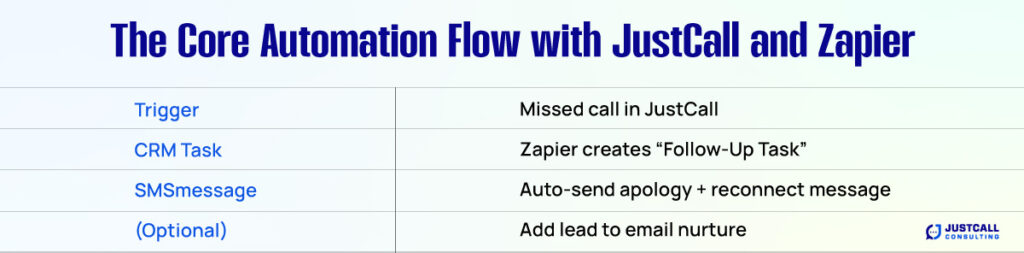
Here’s a proven workflow to follow up after missed calls without lifting a finger. This setup uses JustCall to detect missed calls and Zapier to trigger a sequence of actions that keep your pipeline warm.
Step 1: Trigger – Missed Inbound Call in JustCall
The automation starts when JustCall registers a missed inbound call. This includes calls that weren’t answered by a rep or team member, and where the caller didn’t leave a voicemail, or even if they did. This is your signal that someone tried to reach out and didn’t get connected.
Step 2: Action – Create a Task in Your CRM
Once the missed call is detected, Zapier creates a task in your CRM, whether it’s HubSpot, Pipedrive, Salesforce, or another platform. This task can be labeled as “Missed Call – Follow Up” and assigned to the correct sales rep based on routing rules or ownership.
Adding this to your CRM keeps your sales pipeline clean and ensures the lead doesn’t go cold without someone noticing.
Step 3: Action – Send a Follow-Up SMS Automatically
Immediately after the missed call, your automation can send a personalized SMS to the lead using JustCall’s SMS feature. The message might read:
“Sorry, we missed your call. Would now be a good time to reconnect, or is there a better time later today?”
This message not only acknowledges their call but also gives them control over the next step, making it more likely they’ll respond.
SMS open rates are over 90 percent, making this an incredibly effective re-engagement tactic compared to email alone.
Step 4 (Optional): Add the Lead to an Email Nurture Sequence
If the caller is already in your CRM, or if you collect their info during the SMS exchange, you can use another Zapier step to add them to your email marketing list. Tools like Mailchimp, ActiveCampaign, or HubSpot can begin a lead nurture sequence that warms them up with helpful content while your reps re-engage.
This is especially useful if you can’t reach the prospect immediately. It ensures that they’re still hearing from you, even if the conversation hasn’t started yet.
Benefits of Automating Missed Call Follow-Up
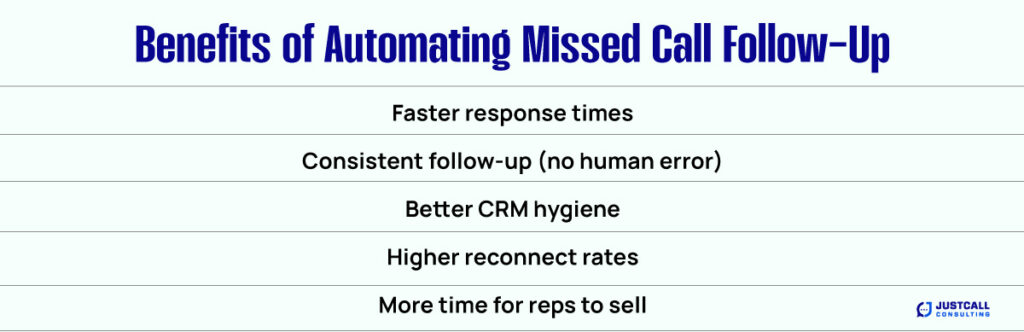
Automating this process delivers several key advantages for your sales and support teams:
- Faster response times increase your chance of converting the lead
- Consistent follow-up that doesn’t rely on manual tracking
- Improved CRM hygiene, with every missed call documented
- Higher reconnect rates, since leads feel acknowledged quickly
- More efficient reps, who can focus on conversations rather than admin tasks
You’re not just saving time. You’re capturing revenue that would otherwise disappear.
Use Cases Across Sales and Support
This workflow is valuable in nearly any client-facing environment.
In sales, reps often miss calls when they’re already on the line. Automation ensures prospects don’t go dark. For support teams, quick SMS replies can help reduce ticket volume by resolving simple issues before escalation.
Agencies and consultants can keep potential clients engaged even when meetings overlap or team members are unavailable. If your business relies on inbound calls, this system is a must-have.
Tips for Setting Up Your Zap
While the workflow is simple, here are a few tips to make it run smoothly:
- Use filters in Zapier to ensure only missed calls from qualified leads trigger follow-ups
- Personalize your SMS messages with first names or source tags pulled from your CRM
- Set fallback alerts in Slack or email to notify managers if too many missed calls stack up in a short period
- Combine voicemail logic to trigger different flows for leads who leave a message versus those who don’t
By layering conditions and branching logic, you create a smarter system that aligns with how your team works.
Stop Losing Leads to Missed Calls
Your prospects are busy, and your reps are human. That means missed calls will happen. But with the right automation, you don’t have to lose the lead.
Using JustCall and Zapier, you can respond instantly, follow up with a personalized message, assign the right tasks, and even drop the lead into a nurture campaign, all without manual effort.
It’s one of the simplest automations you can implement, but one of the most powerful when it comes to recovering missed revenue.